Why Phone and Laptop Batteries Swell — and What Never to Do
A puffed-up phone or laptop isn't a fixable glitch — it's a lithium-ion cell failing from the inside, and one wrong move with it can start a fire.
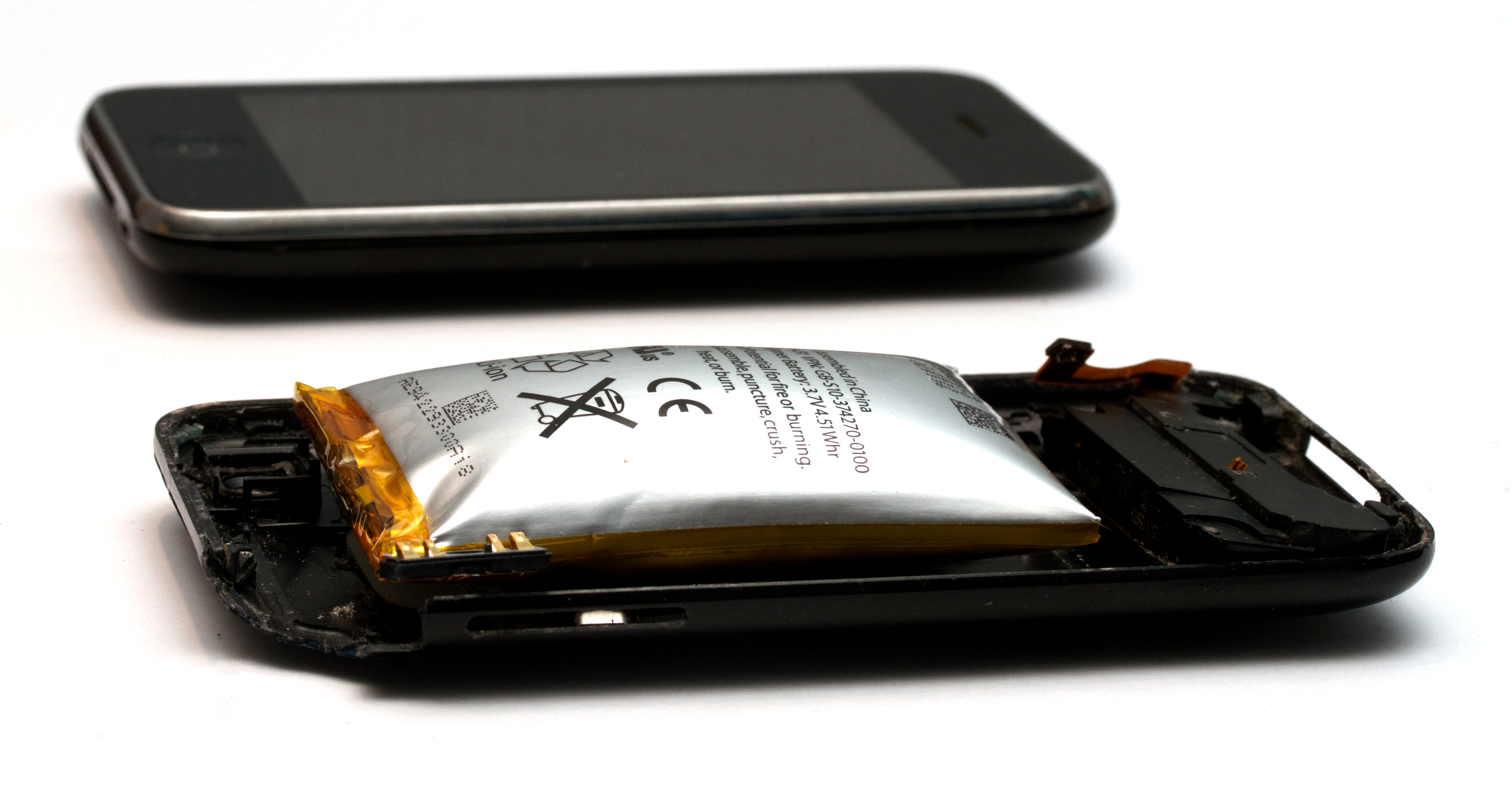
A laptop trackpad that no longer sits flush. A phone that rocks on a flat table like it has a marble taped underneath. A case that used to snap shut and now won't quite close. None of that is a design flaw — it is almost always a battery pushing outward from the inside, and once it starts, there is no fixing it.
The condition is called battery swelling, and it shows up in nearly anything with a rechargeable lithium-ion cell: phones, laptops, tablets, drones, e-bikes, power banks. iFixit's repair guide puts it plainly: as a lithium-ion battery ages, the chemical reaction that generates its power stops completing cleanly, producing gas — what engineers call outgassing — that has nowhere to go inside a sealed cell except out.
What's Actually Happening Inside the Cell?
Every lithium-ion cell is built from layers packed into an airtight pouch or can: an anode, a cathode, an electrolyte, and a thin separator keeping the two electrodes apart. Battery manufacturer Ufine explains that when a cell is stressed or simply old, side reactions inside the electrolyte start throwing off carbon dioxide, carbon monoxide and assorted hydrocarbons. Trapped in a sealed case, that gas has only one place to go: outward, against the case, the trackpad, the screen.
Four things reliably trigger it, and in real devices they overlap constantly: sustained overcharging, heat (a phone left on a dashboard, a laptop charging under a pillow), simple aging — most consumer lithium-ion cells start showing real wear after 300 to 500 charge cycles or two to five years of use — and physical damage from a drop or crush that tears the internal separator.
What's the One Thing You Should Never Do to a Swollen Battery?
Don't puncture it. Don't press it flat to force the case shut. Don't keep charging it to see if it goes back down. iFixit's own removal guide is blunt about the failure mode: if the separator between the electrodes fails or an internal short develops, the cell can enter thermal runaway — its own chemistry cascading into a fire that doesn't need outside oxygen to keep burning. That is exactly the scenario a consumer investigation into a defective battery pack caught on camera; the segment below covers a swollen power bank pulled from service before it ignited, the same lithium-ion failure mode that shows up in phones and laptops.
Manufacturers have gotten better at buying a margin against this. Modern battery management systems track voltage, current and temperature in real time and cut off charging before a cell is pushed toward the danger zone, and cell makers now build in pressure-relief vents and shutdown separators as a last line of defense. None of that reverses a swell that has already happened — it only lowers the odds of getting there in the first place.
Does the Charger You Use Actually Matter?
A cheap or mismatched charger is one of the more avoidable ways to get here. Daybreak Wire has covered why wireless chargers run hotter than a cable and why two chargers rated at the same wattage still charge at different speeds — both come down to how tightly a charger's circuitry actually regulates voltage and current, which is precisely the variable that pushes a stressed cell toward outgassing. A charger that overshoots, even slightly, adds up over hundreds of cycles.
What Should You Actually Do About It?
Stop using the device the moment you notice a bulge, a gap, a stiff button, or a sweet, faintly metallic smell — outgassing often has an odor before it has a visible bulge. Don't charge it further; run it down if you safely can. Set it on a hard, nonflammable surface — tile, concrete, a metal tray — away from anything that burns, and get the battery out through a repair shop or, for iFixit customers, the company's own e-waste collection program. A swollen cell cannot legally be shipped in the mail without hazardous-materials clearance, and it does not belong in household trash or a curbside recycling bin.
There is no repairing a cell once it has swollen, only replacing it and getting rid of the old one properly. The trackpad that won't sit flat is telling you something real about the chemistry underneath it, and the fix is the same whether it's a five-year-old laptop or a two-year-old phone: pull the battery, don't squeeze it, and don't wait.